
Object actions, visibility, and edit locks
Use contextual actions and keyboard shortcuts without losing track of the physical assembly.
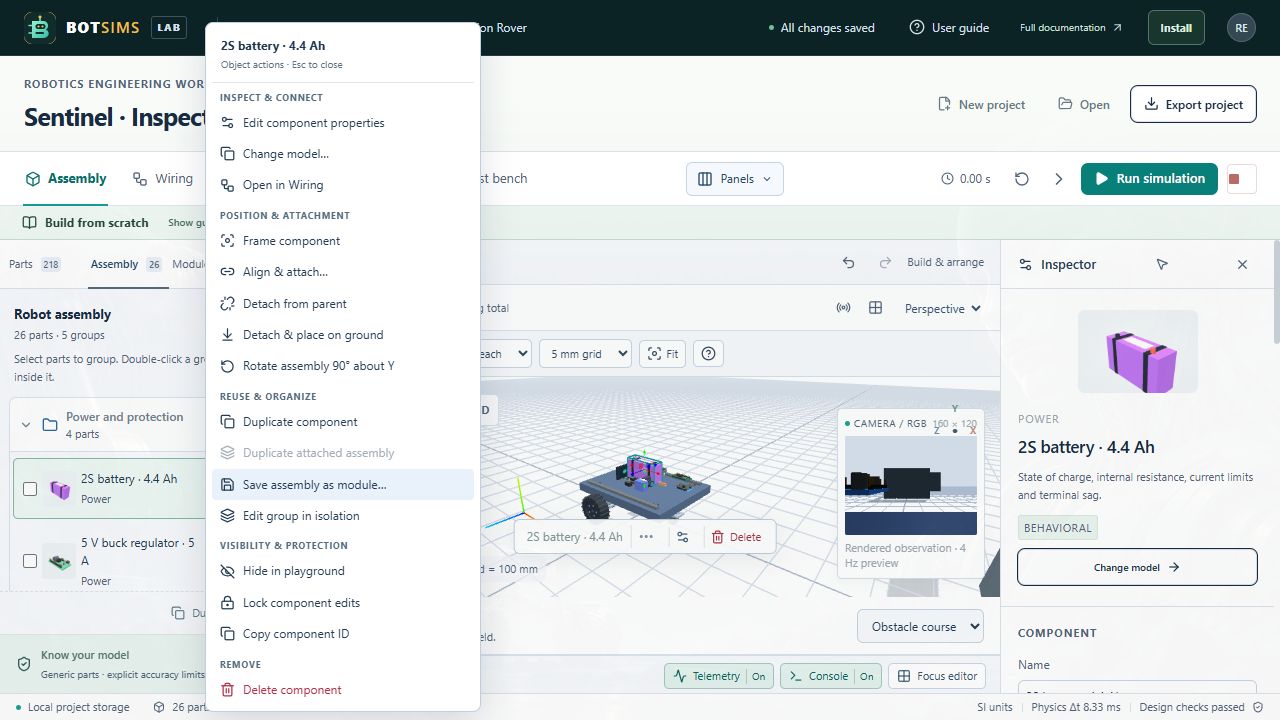
Right-click a visible object, open its assembly-row options button, or use More selected component actions. Actions are grouped into inspection, positioning, reuse, visibility and removal. Arrow keys, Home/End, Enter and Escape navigate the menu. Unsupported or locked actions are disabled.
- Edit component properties or change a related model. Open its Wiring card and copy its stable instance ID.
- Frame the component, align and attach it, detach it, ground it, or rotate its attached assembly by 90 degrees about Y. Numeric rotation and movement are in Inspector.
- Duplicate one component, duplicate a mounted subtree with internal wires, save the subtree as a reusable module, or isolate its editing group. Copies use fresh IDs and stage on clear ground.
- Hide/show editor meshes, protect a component with Lock edits, or delete an unlocked component. Show all restores hidden meshes. Removal has Undo; attached children are preserved and detached when their parent is removed.
| Shortcut | Action |
|---|---|
| F | Frame the selected component |
| Ctrl/Cmd+D | Duplicate selected component |
| Ctrl/Cmd+Z | Undo |
| Ctrl/Cmd+Shift+Z or Ctrl+Y | Redo |
| Delete / Backspace | Remove unlocked selected part |
| Alt while moving | Bypass snap and grid |
| Shift before dragging | Use a vertical movement plane |
Shortcuts leave text fields, dialogs, object menus and the wiring editor in control of their own editing keys.