
Build it. Connect it.
Find out what changes.
One project holds the assembly, the connections and the controller. Move through the workbench in small steps, test an assumption, then improve the design with the evidence in front of you.
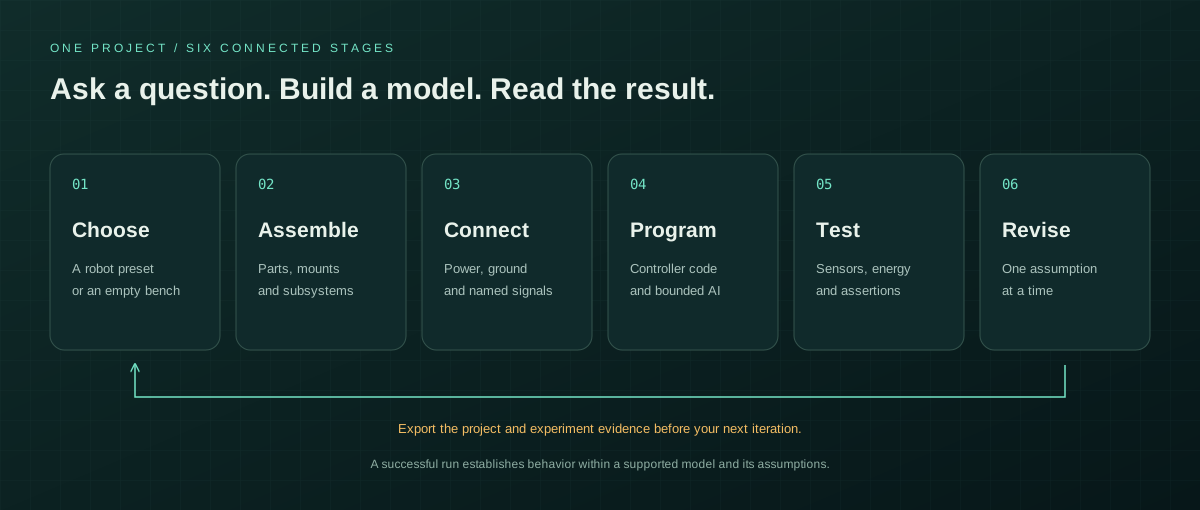
Six steps to a more useful robot model
Choose a starting point
Open a robot family and inspect its variants, or start with an empty workbench. A preset includes a reference layout, connections and example controller where supported. Read its simulation coverage before you run it.
Explore robot presets →Assemble your robot in 3D
Add parts from the categorized library. Inspect dimensions, mass and model parameters. Drag compatible generic mounting points nearby to preview an attachment, organize components into groups, and save useful subsystems as module presets.
Learn snapping and mounting →Connect named electrical pins
Electrical parts appear in the Wiring workspace. Drag a pin near another pin, use the snap target, or select endpoints from the accessible controls. Power, ground, signals and motor connections have different roles. Read supported diagnostics and investigate warnings.
Understand the wiring canvas →Give the robot a controller
Write JavaScript against BotSims's virtual device API. Read sensors, request bounded wheel or servo actions, and inspect runtime logs. The code executes in a bounded guest environment; it is not chip-level firmware emulation.
See controller examples →Run a question, not just an animation
Run, pause or step the simulator. Observe battery voltage, current, motion and available sensor values. Try the supported terrain and fault scenarios. For repeatable checks, run your current program in an experiment with explicit thresholds and export its trace.
Create an experiment →Revise, save and share the evidence
Replace a component model with a preview of retained wiring, adjust an assumption, or revise the controller. Export your project and experiment report. Browser storage is convenient working state; your exported file is your portable backup.
Save and export a project →
Add AI when the foundation is ready
Start with the offline sensor fixture to understand the action contract. For a live model, select a supported provider, enter your own API key, discover account models or supply an exact model ID, and test an action. Inspect the returned wheel, servo and text goals before applying the short command.
Cloud actions can cost money in your provider account. Listing a model does not guarantee that it can return the required action format. Keys are memory only in the dedicated field; the privacy page explains the request route and the selected provider receives the reduced observation.
Read the AI setup guide ↗Know what the result can establish
Useful now
Robot layout, named electrical connectivity, supported virtual devices, code behavior, differential-drive power and traction, kinematic joint previews and bounded engineering experiments.
Requires other evidence
Manufacturer fits, detailed circuits, full articulated torque dynamics, gait stability, real firmware timing, acoustic behavior and physical safety or manufacturing certification.
Use the accuracy and physical limits chapter as part of your test plan. A successful simulated run is evidence about a model with assumptions.
Turn an idea into a working model.
Start from a robot preset or bring your own design to the workbench.