
Troubleshooting and frequently asked questions
Resolve common assembly, wiring, runtime, AI, and storage issues.
I added a component. Why can I not see it?
New components are staged on the ground beside existing footprints. Select it in Assembly and use its inspector, top/front view or orbit/zoom. A large layout may require zooming out. Open component in Wiring locates its electrical card. Group isolation can hide items outside the current group.
How do I delete a component?
Use its Assembly-row trash button, the selected-part control in the viewport, Remove component in the inspector, or Delete/Backspace when not editing text. Undo restores the part and its logical wires.
Why does Run say the design has errors?
Open Test bench and resolve error-level diagnostics. Check invalid parameters, shorts, output conflicts, duplicate I²C addresses, and incompatible supply voltages. Warning-only geometry parts can still run within the stated limits.
The robot does not move. What should I check first?
Start from the working rover template. Check controller power, shared ground, powered motor driver, both motor leads per channel, PWM paths, wheels, zero commands, and battery faults. Verify that your chosen motor is the supported behavioral drive motor rather than a geometry-only variant.
The wheels look correct but behavior did not change. Why?
Visual wheel size and motor wheelRadius are separate parameters. Gear meshes, belts, and other transmission-layout parts do not automatically alter the behavioral drivetrain ratio.
Do I need shared ground even if every part has a positive supply?
Yes. A complete modeled supply and return path is required, and the controller/driver/signal devices need compatible shared grounds. A positive lead alone does not power a device.
I added a wire or connector model. Why is the sensor still disconnected?
A cable mesh is separate from logical pin connections. In Wiring, connect the required endpoints. For a declared pass-through component, wire both sides using its actual continuity mapping. Geometry-only parts do not create unsupported electrical behavior.
Why did current drop to zero after a brownout or overload?
The generic protection can latch power off. Telemetry may then show open-circuit voltage and zero current. Fix load, supply, or parameter issues and Reset before running again.
Why does my display not show the expression?
Check the supported display's power, ground, SDA, SCL, and available controller path. Confirm the program actually emits a display expression and the controller is not browned out.
Why is a range value missing or null?
The supported sensor may be unpowered, missing a signal path, or affected by Sensor dropout. In guest JavaScript, unavailable host values become null. Use Number.isFinite and command a safe stop when unavailable.
Why is the camera image missing?
Check camera power, shared ground, DATA wiring, host availability, and brownout. Open Assembly so the renderer can update a preview after initialization. Turn image attachment off to isolate a text/sensor-only AI test.
My code fails before moving anything. What is allowed?
Define a synchronous function step(robot), use finite motor values in [−1,1], and use only the documented API. No async, imports, timers, fetch, DOM, or packages are available. Large or nonterminating programs exceed the sandbox limits.
Why did my program counter restart after Pause?
Pause terminates the controller. Run starts a new VM and resets program globals. Repeated Single step calls keep the existing controller state unless an edit or stop resets it.
The offline AI returned a stop. Is it broken?
The fixture stops for unavailable range data or brownout. This is expected for a design without a valid range observation. Test its motion path with the wired rover template.
Why is Apply bounded action disabled?
The simulation must be running and a validated action must be available. Changing AI configuration resets the runtime; press Run again, request a fresh action, then apply it.
Why did the AI action stop after a short time?
Actions are limited to 0–2000 ms. Expiry pauses the simulation at zero command and requires an explicit Run. This avoids retaining an old drive command after a response expires.
Why can my cloud model not connect?
Check the exact allowed host/path, model access, key, timeout, network, and JSON/image capability. A compatible API name alone does not guarantee support. Inspect the reported status; 429 indicates a rate limit.
Why can local Ollama not connect?
Run the server on localhost, install the named model, permit the app's browser origin in server CORS, and check browser local-network permissions or HTTPS/HTTP restrictions. Remote LAN Ollama addresses are unsupported. Do not disable browser security.
Why does the AI-timeout scenario fail without a provider call?
It deliberately injects a local delayed failure to exercise stop/watchdog behavior. This is not evidence about a live provider's latency or availability.
Why does my custom component or imported JSON fail validation?
Use supported categories/shapes, unique non-built-in definition IDs, unique pin IDs, positive dimensions/mass, and finite numbers. Keep schemaVersion 1 for projects. JSON cannot contain comments, trailing commas, NaN, Infinity, or code expressions.
Does a passing scenario suite prove my program works?
No. The suite exercises fixed reference commands and the implemented model. Run your own program through normal simulation and Single step, then inspect its logs and measurements under your intended conditions.
Where did my project go after changing browser or deployment URL?
Storage belongs to that browser and site origin. Import your exported project JSON. Keep regular exports because browser data can be cleared and local storage is not a cloud backup.
Where is my API key after reopening the project?
It was never saved or exported. Enter it again in the memory-only key field. Keep keys out of code, prompts, custom JSON, and report annotations.
Can I run any processor, sensor, robot arm, or pneumatic system?
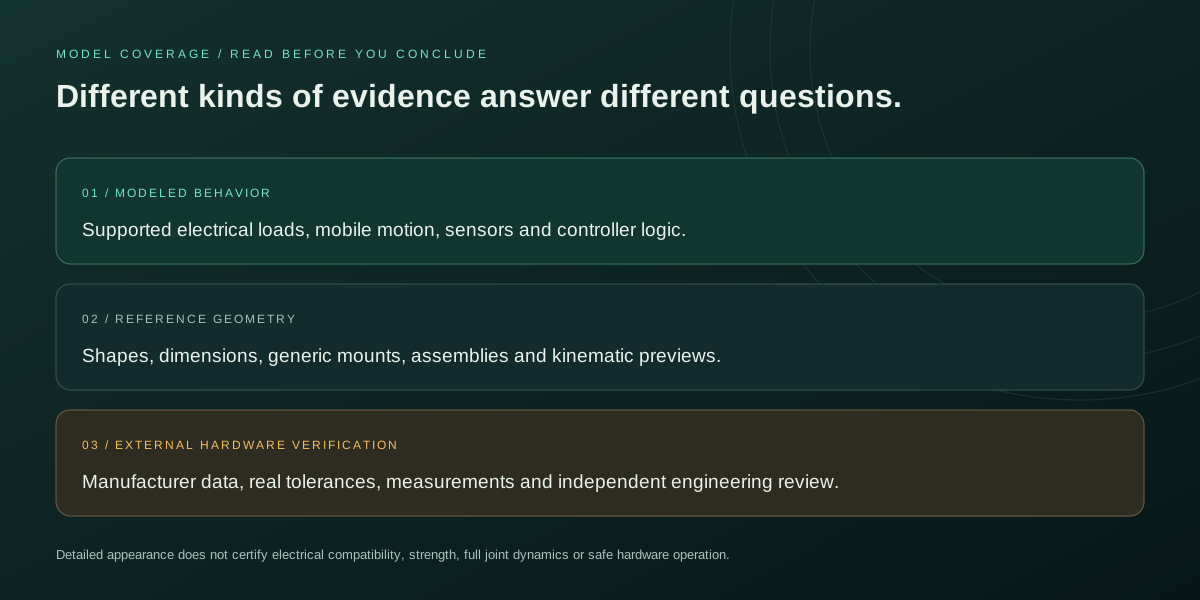
You can plan layouts with many component families, but only the documented device and mobile-robot behaviors are active. Geometry-only warnings identify the boundary. Detailed shapes do not imply complete laws, firmware, or specialist solvers.