
Design drones for different purposes
Compare six airframe shapes, check ESC topology and run the generic multirotor flight model.
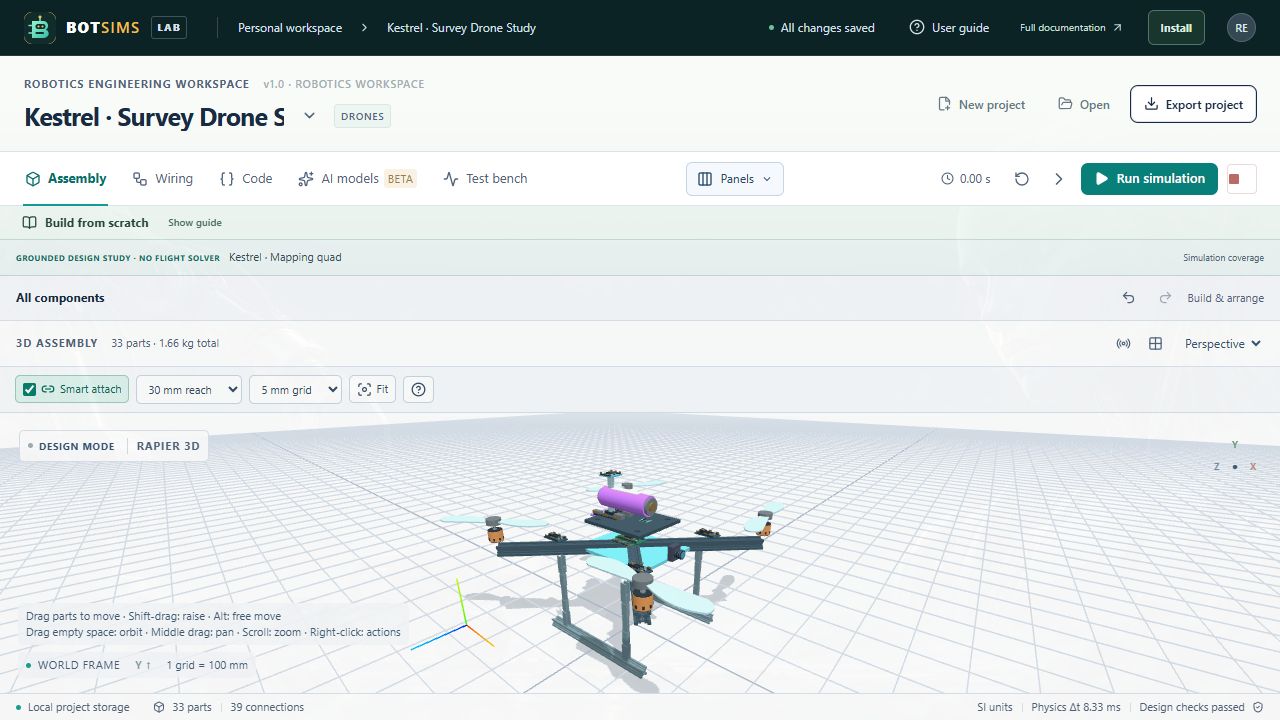
The Drones family contains Kestrel (mapping X quad), Porter (cargo hex), Halo (guarded inspection quad), Truss (coaxial octo), Orchard (agricultural hex with tank and booms), and Manta (winged VTOL concept). These are generic educational layouts, not manufacturer replicas or airworthy designs.
| Design | Packaging study | Rotor count |
|---|---|---|
| Kestrel | Forward camera and raised GNSS placement | 4 |
| Porter | Tall landing gear and underslung cargo pod; 0.5 kg payload assumption | 6 |
| Halo | Open protective rotor ducts for confined-space packaging | 4 |
| Truss | Two stacked rotors per arm; compare coaxial cabling | 8 |
| Orchard | Empty tank and spray booms; separate 2 kg liquid payload assumption | 6 |
| Manta | Swept wing arrangement, twin booms and lift rotor placement | 4 |
- Export your current robot before opening a new preset. Choose Drones in the template chooser, read its model coverage, and load a design.
- Inspect the airframe, landing gear, propeller hubs, ESC layouts and camera in Assembly. The lowest support envelope starts on the ground.
- Enter the airframe, propulsion or avionics group to work on a subsystem. Exit the group to return to the complete assembly.
- In Wiring, trace battery positive through the ideal distribution board to each ESC input and the regulator. Check shared ground, controller signal aliases and the three named phase wires to each brushless motor.
- Run the included takeoff, hover, translation and landing controller. Flight deck overrides its targets and exposes wind, density, drag and rotor-failure conditions. Battery current now includes propulsion demand. See Drone flight for equations and limits.
- Export the project. Documentation includes two complete from-blank builds; the earlier Kestrel video is explicitly archived because it predates flight support.
The GNSS receiver is an unpowered placement part. Controller channels SERVO_1 through SERVO_8 are virtual aliases, not a verified physical flight-controller pinout. Use exact hardware datasheets and a suitable flight dynamics and controls tool for airborne validation.