
Drone flight: controls, camera and physics
Take off, hover, maneuver and land six editable drone designs using generic rotor forces and a live onboard view.
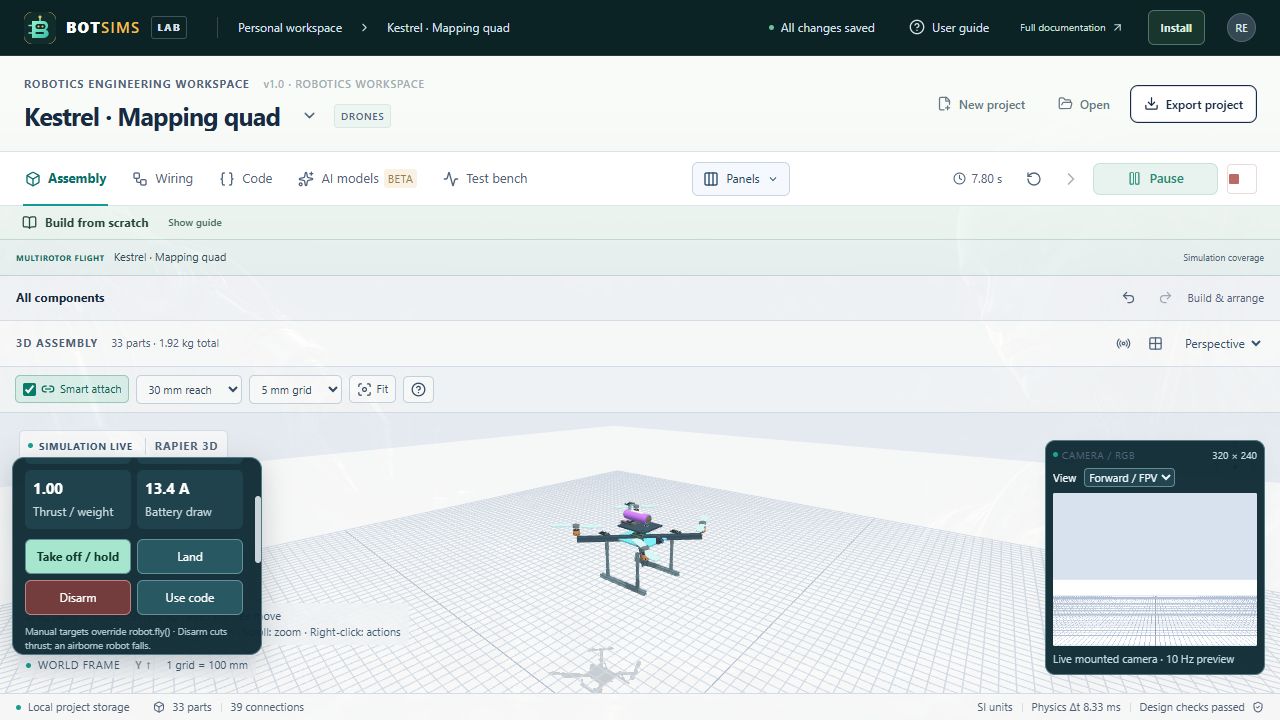
- Open any drone preset, then collapse the Build from scratch guide to gain space. Run simulation starts its takeoff, hover, short translation and landing program.
- Use Flight deck → Take off / hold to override the program. Set altitude (0–15 m), world X/Z (±20 m) and yaw (radians). Land holds X/Z while descending at 0.35 m/s. Disarm cuts rotor drive; an airborne aircraft falls. Use code returns control to step(robot).
- Run enables the small Camera preview. Select Forward / FPV, Downward or Rearward. These are virtual view directions at the mounted camera; no physical gimbal is implied. Camera power/data wiring is required. Panels lets you hide Camera preview and Flight deck independently.
- Expand Rotor telemetry & conditions for RPM, thrust, ESC current and temperature. Set density, wind, gusts, drag area or a failed rotor number (0 = none). Conditions are saved in the project and reset simulation when changed. Below 12% charge, a supervisor requests controlled landing; pack protection can still remove power.
- Inspect a propeller to edit diameter (m), Ct, spin (+1 or −1) and coaxial interference. Motor maxOmega is rad/s at 16.8 V; timeConstant is seconds. ESC maxCurrent is amperes. Battery capacity, resistance, current limit and mass are editable engineering assumptions. Export your project to preserve them.
javascript
function step(robot) {
  robot.fly({armed: true, altitude: 1.2, x: 0, z: 0, yaw: 0, land: robot.time > 20});
  // robot.flight exposes altitude, velocity, attitude and rotor estimates.
  // Optional rotors: [0..1, ...] bypasses the autopilot for direct rotor demands.
}| Model | Equation / behavior | Assumptions |
|---|---|---|
| Rotor thrust | T = Ct × ρ × (ω / 2π)² × D⁴ × interference | Ct and coaxial factor are generic editable constants. D in m, ω in rad/s, ρ in kg/m³, T in N. |
| Rotor lag | ωnext = ω + (ωtarget − ω) × (1 − exp(−dt / τ)) | Target speed scales with battery rail voltage. Current limiting reduces acceleration; thermal protection removes drive at 120 °C. |
| Electrical demand | P = [T^(3/2) / (0.7 × sqrt(2ρA)) + positive rotor kinetic-energy rate] / 0.88 + 1.5 W | Generic figure of merit, efficiency and 10⁻⁵ kg·m² rotor inertia. A = πD²/4. Coasting consumes no drive power. |
| Battery | Vrail = Voc(SOC) − I × R; SOC integrates I / capacity | Uses the shared stable-rail solver, pack cutoff and current protection. The UAV pack is an explicit 4S 8 Ah, 0.035 Ω, 100 A, 0.79 kg assumption. |
| Six degrees of freedom | Per-rotor force at its location plus reaction torque Q = ±0.016T | Rapier integrates translation, rotation, mass/inertia, gravity, contact and obstacles at 120 Hz. Collisions use simplified envelopes. |
| Wind drag | F = −0.5ρCdA × |v − wind| × (v − wind) | Seeded sinusoidal horizontal gusts; generic body drag and angular damping. |
| Autopilot | Position PD + bounded vertical integral → attitude/rate control → least-squares rotor allocation | Ideal simulator pose, 30° tilt bound, finite thrust allocation and saturation warning. Not PX4/ArduPilot firmware or a validated navigation estimator. |
- Controller architecture reference: PX4 multicopter controller diagrams — https://docs.px4.io/main/en/flight_stack/controller_diagrams
- Rotor simulation reference: Gazebo MulticopterMotorModel — https://gazebosim.org/api/sim/7/classgz_1_1sim_1_1systems_1_1MulticopterMotorModel.html
- Induced-power theory reference: NASA rotor momentum theory — https://ntrs.nasa.gov/citations/20210021872